Parts list entry
Description
A parts list consists of individual parts list entries. This module is used to record individual parts list entries, i.e. those entries which only define a certain part at a time. The part can also be a variant part, which may be automatically replaced by a subpart in the course of the parts list explosion.
If, however, you want to define a bill of material entry variably with regard to the part, you can insert a conditional bill of material item into the bill of material.
Functionality
Input window
This window is used to maintain parts list entries. In addition to the part, the quantity and the characteristics, you can also set various options here, e.g. how the item should be exploded when creating a production bill of material. In the second tab "Documents" you can connect the bill of material item with various documents, e.g. with an installation drawing.
| Menu item | Description |
|---|---|
| Edit | - |
| : Features | - |
| : : Insert | Insert new feature |
| : : Features | Create new characteristic |
| : : Remove | Remove current feature |
| : Validity | Set validity |
| : Parts list header | Open the input window for the parts list of the current parts list entry |
| Close | Close window |
| Symbol | Description |
|---|---|
 | Create new parts list entry |
 | Save changes |
 | Delete parts list entry |
 | Print parts list entry |
 | Set validity |
  | Create/edit notes |
 | Edit parts list |
 | Edit part |
 | Display stock movements |
 | Show stock level |
 | Display disposition movements |
 | Show logistics account |
 | Show parts usage |
| Field | Description |
|---|---|
| Position data | |
| Position | Item number of the parts list entry. The formatting can be defined by the counter CX_BILL_OF_MATERIAL_ITEM. It is also possible to set a counter using this counter. By default, there is no counter and the formatting is preset with "000" "000". |
| : from index | Index of the BOM entry. Version of the BOM. This index is written to the exploded BOM item when exploding production BOMs. In this way, it can be traced later with which index (revision) the BOM was exploded. This index of the item has priority over the index of the bill of material of the part in that item. Therefore, if this master BOM item has no index, the system checks whether the master BOM of the part in this item has one. This is then copied. |
| : Short text | Short description for the parts list entry |
| : Cyclical parts list item | If this item is passed through in the course of a BOM explosion, no further BOM explosion of the part takes place: see section on semi-finished products in variant parts |
| Part | Assignment to part |
| : Constructive assembly | Identifies whether the item is to be disregarded in the course of parts planning (MRP assembly), i.e. the assembly of this assembly is carried out together with the higher-level assembly. The assembly time for this assembly should then of course also be taken into account in the routing of the higher-level assembly. This identifier cannot be set if a) the part is not a production part, b) the part has no bill of material, or c) the part is kept as a stock part. |
| Disassemble part | This item is removed from another component already assembled and stored. It is replaced by another similar part. See conversion parts lists. |
| : Quantity | - |
| : : Fixed quantity | The quantity to be used regardless of the quantity of the parent assembly. See. |
| : : Quantity | Quantity of the part to be inserted per unit of measure of the parent assembly. See. |
| : : Variable name of the quantity | In this field a variable name can be assigned to the total quantity of the parts list entry in order to be able to use this quantity in further calculations |
| : : : Omit position if quantity zero | Identification whether the bill of material entry should be ignored if the (variable) quantity is zero: e.g. if the quantity is calculated using a formula |
| : : Notes | Input field for additional notes or comments |
| : : Spare parts list | Marking for issue in a spare parts list. If a spare parts list is automatically generated for an order, then all parts of the parts list items in which this marking is set are taken over. |
| : : Wear parts list | Marking for output in a wear parts list |
| : Features | List of characteristics to describe more precisely the part of this stage or parts of upstream stages |
| Documents | |
| : Structure tree | Using the structure tree on the left side, subfolders or subnodes(  ) can be created. Associations (document references, parts, part roles, partner roles, etc.) can be moved within the structure via drag & drop and thus structured. In addition, it is possible to navigate via the structure tree to display the associations of the folder in the right-hand list. (At present only document references can be structured). |
| : List | The list of document references is on the right-hand side. The local document references are marked with the box symbol (  ) and the global ones with the document reference icon (  ) is displayed. In addition, global document references can also be inserted as a conditional table. Of the associated documents, the description of the document reference is displayed next to the type. This can be either the short title in the operating language or the description text. In addition, the type and the file name are displayed. link: Description of the buttons for maintaining the assignments to the document references |
| Description of structure node | For the folder (structure nodes) defined in the structure tree, a different description can be entered here and saved using the save button to the right of the field. |
| button | Description | ||||||||||||||||||||||
|---|---|---|---|---|---|---|---|---|---|---|---|---|---|---|---|---|---|---|---|---|---|---|---|
| Position data | |||||||||||||||||||||||
| Part | Select part | ||||||||||||||||||||||
| : Features | - | ||||||||||||||||||||||
| : : Apply | Copy characteristic from object | ||||||||||||||||||||||
| : : Create | Create new characteristic | ||||||||||||||||||||||
| : : Insert | Insert new feature | ||||||||||||||||||||||
| : : Remove | Remove current feature | ||||||||||||||||||||||
| Documents | |||||||||||||||||||||||
| Open | Opens the document of the selected document reference in the preview. Depending on the file type, Adobe Acrobat Reader, Word or, for example, Internet Explorer is started. | ||||||||||||||||||||||
| Insert | When inserting, you can choose between local document references and global document references.
| ||||||||||||||||||||||
| Edit | The document reference can be edited in its editing mask. | ||||||||||||||||||||||
| Remove | If a global document reference is selected, the link between the document reference and the part is broken. Local document references are deleted. | ||||||||||||||||||||||
Quantity / fixed quantity
The quantity and the fixed quantity can be given as a value, formula or conditional table in the parts list.
- Value is an absolute quantity, e.g. "1 piece".
- Formula - Quantity can be determined with a calculation formula. For example, you can access the quantity of the parent item with "transaction.Amount()". The following example calculates an e.g. 1 piece per 250 litres of the superior item as fixed quantity (e.g: "ceil(transaction.Amount() / 250 l * 1 piece)"). This example only works if the quantity of the bill of material is always given in litres. If this is not the case, errors will occur in the calculation due to the explosion of the units.
To solve this problem, there is the macro "ComponentMultiplicator". It divides the attribute "_ComponentMultiplicatorParameter" by the quantity of the BOM. In doing so, the unit tables are reported correctly and logged off, which ensures that there are no unit errors. The macro returns a factor without a unit.
Example of an item :
- Conditional table - This can be used to specify quantities that cannot be represented in a continuous function (formula), e.g.:
Condition Formula transaction.Amount()>50pcs 10 pieces transaction.Amount()>25pcs 6 pieces 1 piece
Examples of values that can be used in a formula or condition in the bill of material:
| Access printout | Description |
| this.amount.Amount() | Quantity of the item |
| this.baseAmount.Amount() | Fixed quantity of the item |
| transaction.amount.Amount() | Quantity of the parts list |
| transaction.baseAmount.Amount() | Fixed quantity of the parts list |
| TopTransaction().Amount() | Quantity of the top parts list |
| TopTransaction().object.uniqueID | Part number of the top parts list |
Option window
Here you can make settings for the import of parts list items from an Excel file. Once set, options can be saved as a default option for the logged in user. For this purpose, there is a context menu entry on the "Preferences" tab in the "User Preferences" list, which can be used to save the current options.
| Menu item | Description |
|---|---|
| Edit | - |
| : Set default settings | all changed settings are reset to default |
| Field | Description |
|---|---|
| Data exchange | |
| : Import from Excel file | For an import of parts list items from an Excel file (.xls or .xslx) the necessary information can be entered here |
| : : Excel spreadsheet * | The number of the Excel spreadsheet must be entered here |
| : : Import from line * | Specification from which line of the import file the data should be read in |
| Data field | The following is a list of data fields that can be specified for import (fields marked with an * are required fields) |
| : : Position number | Position of the specification of the part list item number in the import file |
| : : Part number * | Position of the part number specification in the import file |
| : : Quantity * | Position of the quantity specification in the import file |
| : : Unit of measure | Position of the unit of measure specification in the import file. If a zero is entered here, the disposition unit of the part is used as the unit of measure, if this is not defined, the unit "piece |
| Presets | |
| : Global presets | Global presets can be saved for the client and account. These are displayed here as well as the current default options that each module has. To create a global preset, a user preset must first be saved. With a right click on this user setting and selection of the context menu item "Edit user-defined setting" an editing window for this setting is opened, where the assignment of the employee / user to a client or a cost centre can be changed. (Button "Level") |
| : User Presets | Each user can save any number of presets. It is only important to note that if several settings are found, the first one found is used as the default setting. The name of the setting can be changed with a double-click. |
| button | Description |
|---|---|
| OK | The settings are saved and the window is closed. |
Related topics
- Index
- Conditional parts list item
- Conversion parts lists
- Parts list
- Work plan
- Conditional order of work
- Calculation formula
- Conditional table
Technical documentation
- Overview
- Implementation
- Quality assurance
- Individual allocation of basic module
- Parts list entry module
Overview
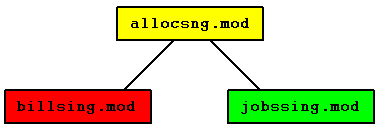
Individual allocation of basic module
Module name
allocsng.mod
Classes
Security
In addition to restricting access rights via the class and its data fields, the module can be restricted in its use via some of the received messages.
| Message | Parameters | Function | Security |
|---|---|---|---|
| EDIT_SINGLE_ALLOCATION | NULL or single allocation object | Call up input window for individual allocation |
| Message | Parameters | Function | Receiver module |
|---|---|---|---|
| EDIT_SINGLE_ALLOCATION | NULL or single allocation object | Call up input window for individual allocation | Single Allocation Editing Module |
| EDIT_VALIDITY_BY_DATE | Window title, object, recipient of the reply | Call up the input window for validity | Validity Editing Module |
| SINGLE_ALLOCATION_CHANGED | Single allocation object | Individual allocation was changed | |
| SINGLE_ALLOCATION_CREATED | Single allocation object | Individual allocation was created | |
| SINGLE_ALLOCATION_DELETED | Single allocation object | Individual allocation was deleted |
Parts list entry module
Module name
billsing.mod
Classes
Security
In addition to restricting access rights via the class and its data fields, the module can be restricted in its use via some of the received messages.
| Message | Parameters | Function | Security |
|---|---|---|---|
| ATTRIBUTE_SELECTED | Attribute object | Attribute was selected | |
| COMMENT_CHANGED | Object | Comment has been changed | |
| DELETE_BOM_SINGLE_ENTRY | Parts list entry object | Delete parts list entry | |
| EDIT_BOM_SINGLE_ENTRY | Parts list entry object | Call up input window for parts list entry objects | |
| EDIT_SINGLE_ALLOCATION | NULL or single allocation object | Call up input window for individual allocation | |
| ITEM_SELECTED | Part master object | Part master was selected |
| Message | Parameters | Function | Receiver module |
|---|---|---|---|
| BOM_SINGLE_ENTRY_CHANGED | Parts list entry object | Parts list entry was changed | |
| BOM_SINGLE_ENTRY_CREATED | Parts list entry object | Parts list entry was created | |
| BOM_SINGLE_ENTRY_DELETED | Parts list entry object | Parts list entry was deleted | |
| EDIT_BILL_OF_MATERIAL | Parts list object | Call up input window for parts lists | |
| EDIT_BOM_SINGLE_ENTRY | Parts list entry object | Call up input window for parts list entries | Parts List Entry Editing Module |
| EDIT_COMMENT | Object | Open the input window for comments | Comment editing module |
| EDIT_ITEM | Part master object | Call up input window for part master | Part master editing module |
| EDIT_SINGLE_ALLOCATION | NULL or single allocation object | Call up input window for individual allocation | Single Allocation Editing Module |
| EDIT_VALIDITY_BY_DATE | Window title, object, recipient of the reply | Call up the input window for validity | Validity Editing Module |
| SELECT_ATTRIBUTES | NULL or Collection attribute objects | Call up the selection window for attributes | Attribute selection module |
| SELECT_ITEM | NULL or Collection part root objects | Call up selection window for part master | Part master editing module |
| SHOW_PREVIEW | Widget | Print Preview | Print Preview |
| SINGLE_ALLOCATION_CHANGED | Single allocation object | Individual allocation was changed | |
| SINGLE_ALLOCATION_CREATED | Single allocation object | Individual allocation was created | |
| SINGLE_ALLOCATION_DELETED | Single allocation object | Individual allocation was deleted |


