Frequently Asked Questions (FAQs) and known error messages, their cause and suggested solutions
- General
- Printing (Word/BIRT/PDF)
- Job processing
- Incoming invoices
- Warehouse statistics
- Online help
- GESTIN
- HESTIA
- The ClassiX system does not boot up
- Error messages in operational mode
- Programming
- Error handling TAPI
- Error handling WebService
- MorphIT
General
- Why is my data not saved when I close the window?
- How can I cancel the search via an input field?
- How can I close all open windows at the same time?
- Why does ClassiX® not react to my mouse or keyboard inputs?
- Display problems - labels of buttons, checkboxes etc. are displayed incompletely.
 Why is my data not saved when I close the window? Why is my data not saved when I close the window? |
|---|
Data to be entered is always saved via the diskette symbol.  saved. saved.Closing a window directly allows resetting data that has not yet been saved. |
| How can I cancel the search via an input field? |
|---|
| You can try to cancel a running transaction via the key combination 'Ctrl-F12'. If this is not possible, you must be patient. |
| How can I close all open windows at the same time? |
|---|
| Select 'Close all' in the last menu item 'Windows'. |
| Why does ClassiX react® not respond to my mouse or keyboard input? |
|---|
There are several reasons why ClassiX® does not respond to your input:
|


 Then you can see from the cursor that your computer is still working on it.
| Display problems - labels of buttons, checkboxes, etc. are displayed incompletely. |
|---|
There are various reasons why the labelling of buttons, checkboxes etc. is not displayed correctly in ClassiX®:
|
Printing (Word/BIRT/PDF)
- General problems when printing with Word (Word preview)
- General problems when creating PDF files
- Continuous text is wrapped incorrectly
- Printing from ClassiX® and the contents of the clipboard
- Missing information in data fields (person, signature, ...)
- When printing, the control cannot be processed -> Faulty installation, registration or licensing.
- BIRT: Value specification in totals line is incorrect
- When printing OLE or editing OLE objects, the message "Name of function not in MDI ..." appears.
- Error! Unknown op-code for linked condition
- Barcodes are not printed in Word
- Conversion from these types to COM types is not yet supported
- Related topics
| General problems when printing with Word (Word preview) |
|---|
|
| General problems when creating PDF files |
|---|
|
| Continuous text is wrapped incorrectly |
|---|
|
| Printing from ClassiX® and the contents of the clipboard |
|---|
|
| When sending an email, Outlook reports with an error message |
|---|
|
| Missing information in data fields (person, signature, ...) |
|---|
|
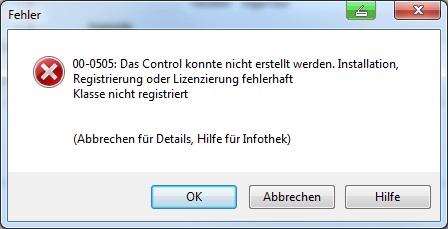
| When printing, the control cannot be processed -> Faulty installation, registration or licensing. |
|---|
 |
| Possible cause: |
| This message occurs when the control to be accessed is faulty. Control can mean MS Word, a component of Microsoft WebCoponents2003, etc. |
| Check: |
| Check in the code which control is to be accessed. |
| Solution: |
| WebComponents: If WebComponents2003 are faulty, they must be reinstalled. MSWord |
| BIRT: Value in sum row is wrong |
|---|
| Possible cause: |
| This behaviour occurred in an English-language operating system environment with German ClassiX Locale (location). |
| Verification: |
| Check config.ini in the BIRT Runtime folder. |
| Solution: |
| The following entry must be added to config.ini in the BIRT runtime folder (%BIRT_HOME%\ReportEngine\configuration\): osgi.nl=de_DE This sets the locale hard to German, which makes the sum calculation correct again. |
| When printing OLE or editing OLE objects, the message "Name of function not in MDI ..." appears. |
|---|
| When editing OLE objects in ClassiX or when OLE printing from ClassiX, the message:
|
| Possible cause: |
|
| Solution: |
|
| Error. Unknown op-code for linked condition. |
|---|
| The expression with XML displays the following line: Error! Unknown op-code for linked condition |
| Possible cause: |
| In the document module, the call following an IF statement is not in quotes: IF { DOCVARIABLE ... } |
| Solution: |
| Determine document module and check all IF statements there and add missing inverted commas: IF "{ DOCVARIABLE ... }" Afterwards, do not forget to convert the module |
| Barcode are not printed under Word |
|---|
| Barcodes entered in Word are not printed. |
| Possible cause: |
| Solution: |
With the field function
any barcodes can be printed under Word. Link to further information. |
| Conversion from these types to COM types is not yet supported (sgn= 2055) -> VT_VARIANT (VARIANT *)|VT_BYREF |
|---|
| The following error is reported when printing with XML: Conversion from these types to COM types is not yet supported (sgn= 2055) -> VT_VARIANT (VARIANT *)|VT_BYREF |
| Possible cause: |
The form template cannot be accessed by the user. or The template was imported without Word. |
| Solution: |
Go to the form header and check the path of the template. Can all users reach it? Possibly use the variable CX_ROOTDIR so that the template can be accessed by everyone. Switch to a computer with Word and open the form header again. Under the menu item "Edit" there is the function "Import XML template". Execute this. You should then be able to print the form. |
Job processing
| Information messages when changing the traffic light |
|---|
| Known advisory messages |
| Attention, the expression of the article ... is not permitted according to the restriction table. |
| In the sales role of the part mentioned in the advice message under the tab Additional data, there is a restriction in the group Characteristics of the button. In this case, the permitted attribute combinations are stored there and if these do not match the specification in the item, the message is displayed. Either the order item must be corrected or the restriction table must be extended. |
Incoming invoices
| Rounding differences / account assignment messages due to currency translation |
|---|
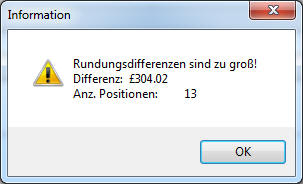 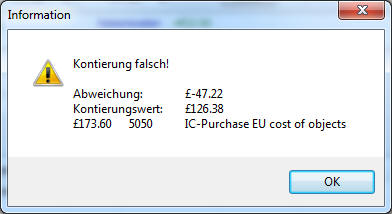 |
| Possible cause |
A conversion between the two currency units is hard defined in unit tables of one of the related parts: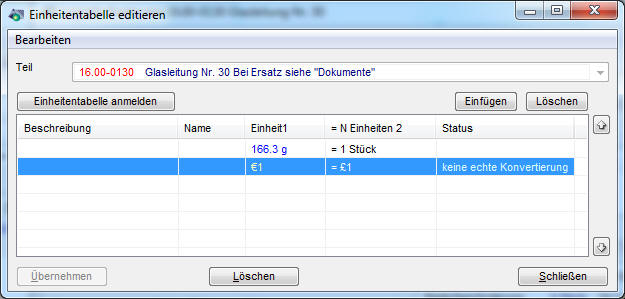 |
| Solution |
| Remove entry from the unit table |
Stock statistics
| Why do the values of the warehouse statistics for a part differ from the actual warehouse stock? |
|---|
| Possible causes |
|
| Solution |
|
Online help (Infothek)
- How do I call up the online help in ClassiX®?
- Why does only one page appear in the browser, where are the individual navigation areas?
- How do I get specific information on a certain topic or term?
- Am I allowed to adapt/expand the content of the help on my own?
| How do I call up the online help in ClassiX?®? |
|---|
| Pressing the 'F1' key on your keyboard opens your default browser with the documentation page of the active ClassiX® window. |
| Why does only one page appear in the browser, where are the individual navigation areas? |
|---|
| If you do not see the navigation areas, the Javascript function of your browser has been deactivated. A current browser with activated Javascript is recommended to display the online help. |
| How do I get targeted information on a specific topic or term? |
|---|
| The Infothek's built-in search function allows you to find information quickly and specifically. |
| May I independently adapt/expand the content of the help? |
|---|
This is only possible in the customised help if you have a user with the necessary rights. |
The ClassiX system does not start up
The error messages that can occur even before the ClassiX System starts up are brought together here.
- The ObjectStore Cache Manager service cannot be started.
- ClassiX cannot be started because ObjectStore cannot open a file.
- After starting the computer, the message "Cannont open application schema" appears when trying to start ClassiX.
- ObjectStore internal error: VirtualAlloc failed to allocate at any address
- ClassiX does not start, but displays the error message "Server access control problem".
- ClassiX does not start, but shows the error message ObjectStore internal error
- ClassiX does not start, but shows the error message ObjectStore internal error 2
- ClassiX does not start, but shows the error message "error during schema validation".
- ClassiX does not start, but shows the error message "RPC: Procedure unavailable".
- ClassiX startup is indicated by the message: "Java.exe cannot be started. Please install Java".
- Crash directly at start (SAP is installed)
| TheObjectStore Cache Manager service cannot be started. |
|---|
| After restarting the server, the ObjectStore Cache Manager service does not start automatically and cannot be started manually. |
| Possible cause: |
| A process or application called ObjectStore Cache Manager has already been started. |
| Check: |
| Open Task Manager and check whether a process or application called ObjectStore Cache Manager has already been started. |
| Solution: |
| The started process/application ObjectStore Cache Manger must be terminated, then the service can be started. |
| ClassiX cannot be started because ObjectStore cannot open a file. |
|---|
| The Cache Manager of ObjectStore was terminated unexpectedly on the terminal server and cannot be started manually. |
| Possible cause: |
| A process or application called ObjectStore Cache Manager has already been started on a terminal server user. |
| Check: |
| Open Task Manager and check whether a process or application called ObjectStore Cache Manager has already been started. (Set checkbox "All users") |
| Solution: |
| The started process/application ObjectStore Cache Manger must be terminated, then the service can be started. |
| After starting the computer, the message "Cannot open application schema" appears when trying to start ClassiX. |
|---|
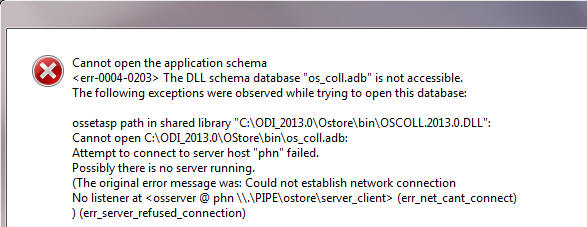 |
| Possible cause: |
| A process or application called ObjectStore Cache Manager has already been started. |
| Check: |
| Open Task Manager and check whether a process or application called ObjectStore Cache Manager has already been started. (Set checkbox "All users") |
| Solution: |
| The started process/application ObjectStore Cache Manger must be terminated, then the service can be started. |
| The Cache Manager is started as a process and not as a service. |
|---|
| When the system is started, the Cache Manager is started as a process and not as a service. |
| Possible cause: |
| ClassiX tries to find the already running Cache Manager at start-up and starts its own process if necessary. The two ObjectStore services start with a delay by default. If ClassiX is started before this grace period, a process is started instead of a service. |
| Check: |
| Show services (Windows key "Services"). Is "Automatic (Delayed Start)" written here behind "ObjectStore" for the start type? |
| Solution: |
| Right click, properties, set start type to "Automatic". |
| ObjectStore internal error: VirtualAlloc failed to allocate at any address |
|---|
The ObjectStore database tries to allocate main memory space for itself before starting the system, which is no longer available on the computer.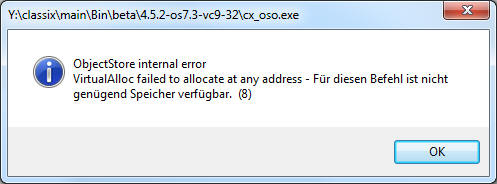 |
| Possible causes: |
| Too little main memory is installed on the computer or other programmes are running on the computer that have already almost completely used up the main memory space. The environment variable OS_AS_SIZE may also be set too high. |
| Check: |
| - |
| Solution: |
| Close other programmes or lower the OS_AS_SIZE |
| ClassiX does not start, but shows the error message "Server access control problem". |
|---|
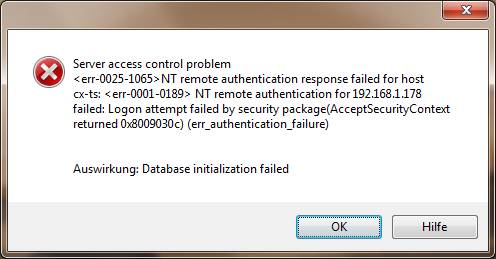 |
| Possible cause: |
| The database server is ObjectStore 7.3 without patch and the user's machine is outside the domain. |
| Check: |
| Execute the command osversion in the command prompt of the ObjectStore server. Alternatively, the file ../ODI7.3/OStore/Bin/osversion.bat can be executed. When the patch is installed, the following line is output: ObjectStore Cumulative Patch Release 7.3.0.02 |
| Solution: |
| The patch 7.3.0.02 must be installed on the server. |
| ClassiX does not start, but shows the error message ObjectStore internal error |
|---|
 |
| Possible cause: |
| There was a crash of the ObjectStore Cache Manager and the next ClassiX user started the Cache Manager as a process. All other users can then no longer start ClassiX. |
| Review: |
| Is an ObjectStore Cache Manager service or process running? (Check once for all users on the terminal server). |
| Solution: |
| End the ObjectStore Cache Manager process and start the ObjectStore Cache Manager service. |
| ClassiX does not start, but displays the error message ObjectStore internal error 2. |
|---|
|
|
| Possible cause: |
| The database server runs with a 64-bit version and is controlled by a 32-bit client. The client attracts 64-bit ADBs and not the required 32-bit ADBs. |
| Solution: |
| Create a directory with the required 32-bit ADBs on the database server and tell the client where the required ADBs are located with the variable OS_SCHEMA_PATH. |
| ClassiX does not start, but shows the error message "error during schema validation". |
|---|
|
|
| Possible cause: |
| A 32-bit ObjectStore client (with 32-bit ADBs) is trying to open a 64-bit ObjectStore database. |
| Solution: |
| Install a 64-bit client or use a 32-bit database. |
| ClassiX does not start, but shows the error message "RPC: Procedure unavailable". |
|---|
|
| Possible cause: |
| The database server is running with a 64-bit version and an attempt is made to open a 64-bit database with a 32-bit client. |
| Solution: |
| The client must be updated to 64bit or a 32bit database must be used. |
Error messages in operational mode
Here are the error messages that can occur while working with the ClassiX system.
- Block nesting overflow
- Error when iterating over a root entry point collection (REP).
- The cluster has been deleted
- A hash function is missing
- Hard crash when displaying an object
- Hard crash when displaying an object (order)
- Evaluate3 - function can only call SendMsg if a MESSAGE is known.
- Timeout and deadlock messages
- Error message with crash when accessing dictionaries
- Error message: Name of data field not in DDI
- The connection to the server was broken
- Formula processing error in connection with UTF8 conversion.
- Statemant stub: call of a (still) undefined statement
- Firewall notification at ClassiX start after ClassiX DLLs exchange.
- No manager object with this name existing WEB_SERVICE
- Failed to generate temporary file
| Block nesting overflow |
|---|
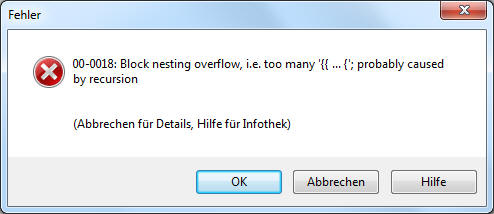 |
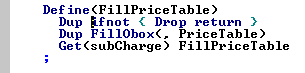
| Cause: |
Recursive macro call may have a maximum of 16 levels. If there are more than one level, this error may occur. |
| Solution: |
Do loop instead of recursive macro call.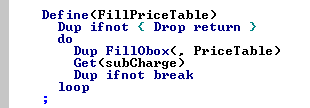 |
| Error iterating over a root entry point (REP) collection. |
|---|
| When iterating over objects of a REP collection, ClassiX® crashes as soon as work is done with the object(s), e.g. a slot is read out. |
| Possible cause: |
The REP collection contains corrupt pointers. |
| Check: |
Call: cxaosr /R CX_CLASS_NAME |
| Solution: |
The REP collection must be repaired:
|
| The cluster has been deleted |
|---|
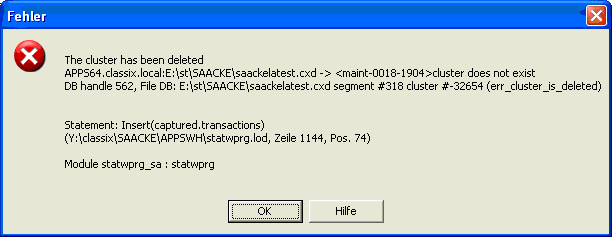 |
| Possible cause: |
| Each master object has stored a Segment+Cluster tuple in the "clusterInfo" slot where new slave objects are to be stored. Due to a bug in an older version of ClassiX®, the value became negative. |
| Check: |
The "clusterInfo" slot of the object (here: a job) is negative. |
| Solution: |
| The slot must be deleted and the step that triggered the error message repeated. The slot is then created again and should then contain a positive number. |
| A hash function is missing |
|---|
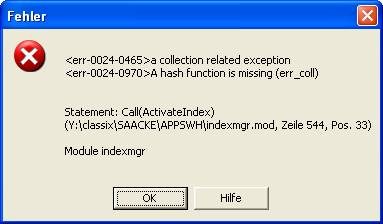 |
| Possible cause: |
| An attempt was made to activate an index that is unsorted. |
| Check: |
Double-click on the index entry in the Index Manager; "Ordered" should be set under "Sorting". |
| Solution: |
| ClassiX® supports only sorted indices for most data fields, e.g. strings. As a rule, this is also what the user means, it was probably just forgotten to switch the index to ordered. |
| Hard crash when displaying an object |
|---|
| Hard crash when trying to display an object. Display in the object inspector is also no longer possible. |
| Possible cause: |
| A slot is damaged and cannot be displayed correctly. |
| Check: |
| The object can still be retrieved with "GrabObject"; under certain circumstances, a "Get" to the broken slot also works. When calling methods of the broken slot (especially virtual methods), the crash occurs. This should then also be confirmed in the log file. One hundred percent verification is only possible with the debugger. |
| Solution: |
| Delete the dynamic data field with "DeleteSlot". This may cause data to be lost, so you should first try to find out which data was stored in the slot. If this is only a basic object (CX_VALUE, CX_DATE etc.), then the operation is not critical. If the slot points to a business object, then this business object should be checked first. |
| Hard crash when displaying an object (order). |
|---|
| Hard crash when trying to access an order. Display in the object inspector is also no longer possible. |
| Possible cause: |
In this case, the order itself is damaged. |
| Check: |
| The error occurs as soon as the object is interacted with, i.e. both a query with the object as a subset and accesses via pointers to the object lead to a crash. |
| Suggested solutions: |
An osverifydb run showed transactions in the order and compound segments whose transaction pointers point to any strings instead of CX_TRANSACTION objects:
As long as the field "uniqueID" is readable, one should be able to find the order concerned via a simple query. You probably only have to prevent the object from being displayed in the ClassiX shell, as this accesses some data fields and can lead to a crash here. Another alternative to find the object would be to export the REP collection of the orders via DumpCollection or ExportCollection to a file (these files consist only of ObjectIds of the elements in text form), then read this file into InstantView and touch the objects individually and log out which object is currently being touched. If the process crashes, you can see the address of the corrupt object in the log file. Once you have the object address of the order, you can |
| Evaluate3 - function can only call SendMsg if a MESSAGE is known. |
|---|
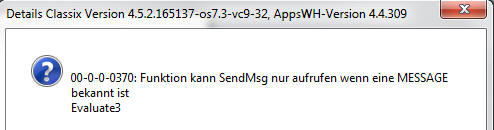 |
| Possible cause: |
| No MESSAGE has been defined with SetBindMessage to be called when a missing attribute is present. |
| Solution: |
| Before the function call (e.g.: Call(Resolve) or Call(ResolveNew)), set a MESSAGE with the function SetBindMessage, with which the missing attribute is caught and processed further. GET_VARIABLES = Query missing variables. MISSING_VARIABLE = error message concerning missing attributes |
| Timeout and deadlock messages |
|---|
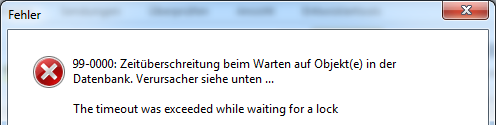 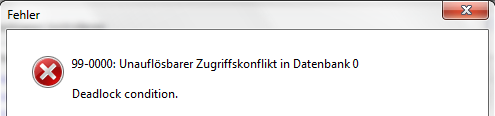 |
| Possible cause: |
| This type of deadlock can occur when there are a large number of users trying to access the same database areas. |
| Solution: |
| If these messages occur repeatedly so that you cannot continue working, please contact your IT department. They can identify and contact the cause relatively quickly (if necessary via the log file) via the information on the "Conflicting client" contained in the message. These blockades can be directly monitored by the IT department using client profiling and, if necessary, the responsible client (user) can be contacted/terminated. |
| Error message with crash when accessing dictionaries (No database is assigned to this location). |
|---|
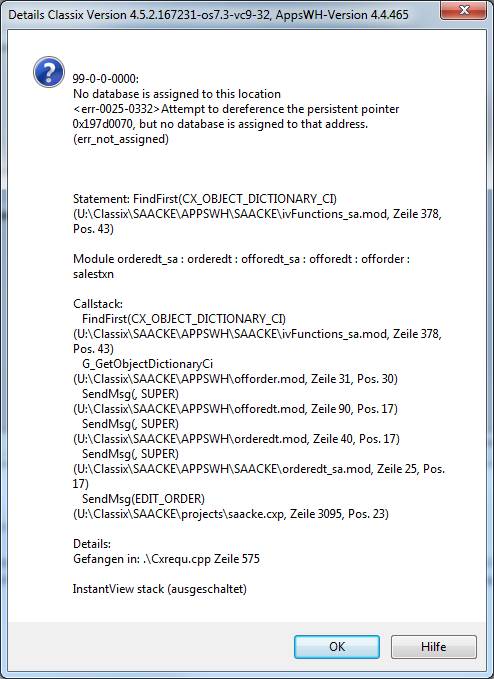 |
| Possible cause: |
| A dictionary entry can no longer be accessed Crash when calling up via Object Inspector: System data - Search term dictionaries -> (Without upper/lower case). |
| Solution: |
| Determination of the entry FindAll(CX_OBJECT_DICTIONARY_CI) iterate(UNSAFE) Skip position to match value and check with working test system: FindAll(CX_OBJECT_DICTIONARY_CI) iterate(UNSAFE) If the entry does not contain any values or is not used, it can be removed (call in the object inspector): FindAll(CX_OBJECT_DICTIONARY_CI) 10 Swap GetElement |
| Error message: Address space is full |
|---|
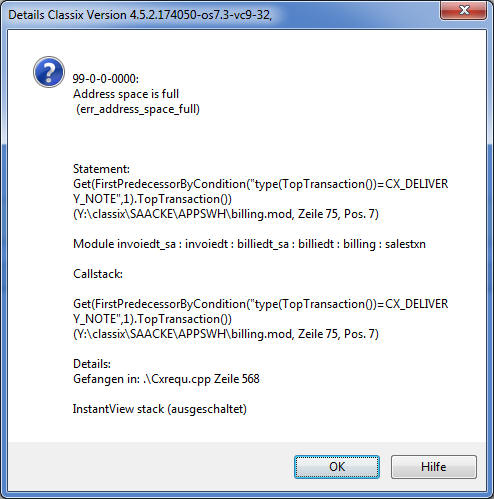 |
| Possible cause: |
| (1) It was started with a too small OS_AS_SIZE. Or (2) The memory requirement is set to "much memory". (32-bit application only - button at the top right in the main toolbar). |
| Solution: |
| (1) The recommended minimum value is 0x440000 (32bit) or 0x50000000 (64bit). The value should be set as high as possible. (2) If the memory requirement is set to "much memory", then the address space handling has been switched off. Set the memory requirement to " little memory" and repeat the operation you want to perform. |
| The connetion to the server was broken |
|---|
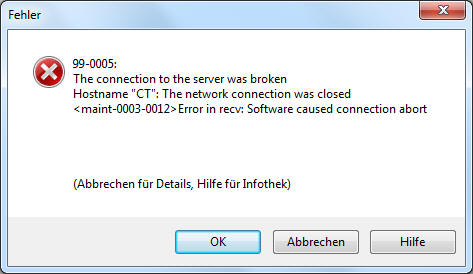 |
| Possible cause: |
|
| Solution: |
|
| Formula processing error associated with UTF8 conversion. |
|---|
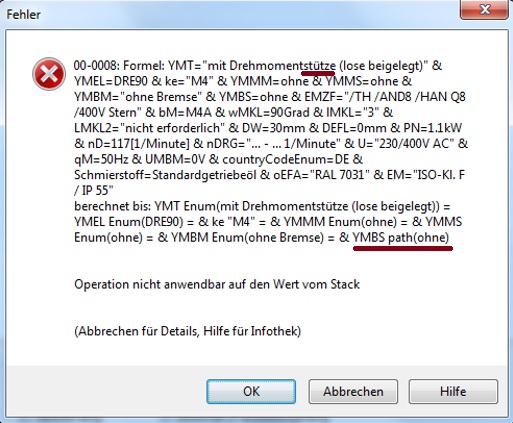 |
| Possible cause: |
During conversion, the value of "YMBS=without" could not be reset because it no longer exists as a NUM entry. |
| Solution: |
Change value to existing entry. (Perforcehistory) |
| Statement Stub: Calling a (still) undefined statement. |
|---|
|
|
| Possible cause: |
In computer science, "stub" stands for a connecting point. If the "connecting point" also connects to the correct end point, it remains invisible. In this case, the definition of the macro Test is missing. (Define(Test)) |
| Solution: |
Define macro Test or adapt the Declare statement and the macro call accordingly. |
| Firewall notification at ClassiX start after ClassiX DLLs exchange. |
|---|
|
|
| Possible cause: |
| The path with the cx_osuo.ece is not released in the firewall. |
| Solution: |
Variant 1 Enter path in the Windoss firewall. (Problem is present again after an update of the ClassiX DLLs and must be released again). Variant 2 Copy ClassiX DLL into a local directory and check at start-up whether the DLL version has changed (if so, then copy again). With this variant, the path only has to be released once in the firewall. Variant 3 User is administrator on the local PC and can allow access. |
| No manager object with this name existing WEB_SERVICE |
|---|
|
|
| Possible cause: |
| The specification of the DLL for the WebService is missing in the _customer_.ini. |
| Solution: |
| Enter the DLL for the WebService in the _Customer_.ini: cxivsa_EXT_. |
| Failed to generate unique temporary file |
|---|
| Temporary files are created in ClassiX. If these files cannot be created, this message is displayed. |
| Possible cause: |
|
| Solution: |
|
Programming
Conversion
| Umlauts and special characters are not displayed correctly in the export file |
|---|
| Possible cause: |
| The created file was not converted to the ANSI code set. |
| Solution: |
| Convert the file to the ASCI code set: CreateTransObject(CX_ASCII_FILE) -> oFile |
Error handling TAPI
| TAPI message Calls cannot be answered with this device. Watch device for voice calls |
|---|
When the TAPI is called, this message is thrown: |
| Verification: |
With this tool from Ectos the TAPI client can be checked. |
| Solution: |
| TAPI call cannot be made. Make voice call |
|---|
| Verification: |
This tool from Ectos can be used to check the TAPI client. |
| Solution: |
MorphIT
| Print (create PDF) in MorphIT |
|---|
In MorphIT, MS WORD cannot be used because MorphIT runs in the background and MS WORD was not developed to be used in the background.
A PDF now exists at the desired location, which can be processed further. (e.g. filename SystemObject Call(OpenDocument) -> The document is downloaded into MoprhIT). |
;)
;)
;)